Friday, May 9, 2014

How to create your own RUN command

Create your own RUN commands and get accessed to destiny place quickly

The Run command on Windows operating system allows you to directly open an application or document with just a single command. So, if you wanna add/create your own RUN command, here is the trick..

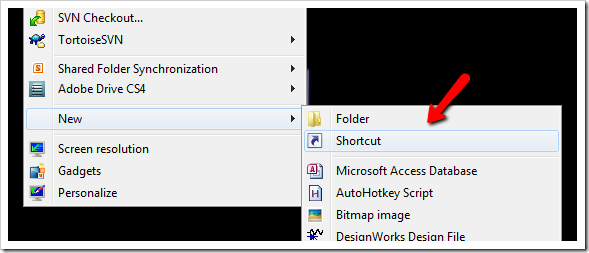
1. Right click on your Desktop and select New -> Shortcut.

2. You will see a “Create Shortcut” Dialog box as shown below
                      
3. Click on “Browse”, navigate to your file or folder for what you want to create command. For example:
                       
4. Now click on “Next” and type any name for your shortcut. You can choose any name as per your choice and click on "OK" and on "Finish".
5. You will see a shortcut you have created on your desktop. All you need to do is just copy this shortcut and paste it in your Windows folder-->(“C:/Windows”). Once you have copied the shortcut into your Windows folder, you can delete the one on your Desktop.

6. That’s it! From now on, just open the Run dialog box and type the command you have crated and hit Enter to open the file/folder.

Make Windows 7 Genuine using Command Prompt

                            
So now i'm going to show you a easy way to make your windows 7 genuine using command prompt.

How to make Windows 7 genuine using Command Prompt

Press Windows key + R
Now "run" box will appear , in "run" box type CMD
Click on OK
Note : Run CMD as Administrator


Now command prompt will appear
In command prompt type SLMGR -REARM
Hit Enter.


Wait 5-10 seconds

Now a message will appear as shown in image below.


Done !!!
Now your Windows 7 is genuine .. :D

Restart your PC once. Hereafter you won't see the warning message that "Windows 7 is not genuine"
"BUT THIS MAKES ONLY FOR FEW DAYS"
source

3D view in Firefox broswer

Hello friends, I'm back with a new funny trick. One of my friend called Jayanth was doing this trick in front of us. Here is the trick, that, How to view a webpage in 3D using Firefox browser


Trick :

Open firefox and open a web page (google.com, facebook.com..... etc)
Click on firefox tab present on top left of browser.
Go to web developers and click web console or just click ctrl+shift+k.
A tab opens at the bottom. In bottom tab go to top right.
You see a 3d box. Hover over it and says "3D view".
Click on it and see the magic. Your current page turns into a 3D page.
Try dragging the page and you can move in 3 dimesions in your firefox browser.
If not found 3d view in that page, then find it by pressing ctrl+shift+i in previous versions of firefox.

To view webpages in 3D in Google chrome web browser Click here

How to search a file in your PC by using CMD, notepad


Hello friends, Here I'm with a new trick How to show your desired-named file in your PC by your CMD. by using notepad. The file you search will be resulted with in 10 seconds.


Just copy and paste the following code in notepad and save it as anything.bat. Remember, save the file with extension ".bat". Or just download the file from here (skip Ad).

set shell = CreateObject("WScript.Shell") fileNam=Inputbox("Enter part of the file name you want to search","File Name") If(fileNam <> "") then dirName=Inputbox("In which drive you want to search ?"+vbcrlf+"Example: If you want to search in D drive then enter only D","Drive name") msgbox "Searching the entire drive may take some seconds. Press OK continue.",,"Message" Shell.run "Cmd.exe" WScript.Sleep 3000 Shell.sendkeys "dir "+dirName+":\ /s /b | find "+Chr(34) + fileNam + Chr(34)+"{ENTER}" End If

Now just open the file. It will promt you to enter the drive letter where you want to search.
Now enter the drive letter and the string you want to search named with.
Now the files along with the path will be displayed in your command promt with in 10 seconds.

How to find password using inspect element

This works only with Google Chrome


Step One: Open Google Chrome. Go to the website that you want to the steal that certain password from. (ex. YouTube, Facebook, G mail)

Step Two: Go to the login interface. If they use Google Chromes program to save passwords, then your in luck.

Step Three: Highlight the password.

Step Four: Right click > Inspect Element

Step Five: This is where things get tricky. A box with a bunch of codes should popup below. The line you're looking for should be highlighted. Look for the following code:" <input type=''password'' "

Step Six: Right click > Edit Attribute


Example image 1


Example image 2

Step Seven: Now double click on it and rename 'password' to 'text' and hit enter.

 ---> 

Step Eight: Copy down the password, and rename 'text' back to 'password'. Also, click the 'x' in the top right corner of the box.
When attribute = password-->
When attribute = text


Steal Saved Password From Web Browsers =>http://goo.gl/fTn2qT

12 Brilliant Command Prompt (CMD) Tricks You Probably Don’t Know About


No matter how good Windows may evolve on the GUI front, Command Prompt was how it all began. So here are some great tips you can use to make yourself comfortable while working with the Command Prompt. like
1. Open Command Prompt in any Folder
2. Enable QuickEdit for Easy Copy/Paste
3.Make Undeletable, Unrenamable Folders
and 8 more amazing tricks using cmd.. Have some fun and knowledge..

Let’s roll, shall we?

1. Open Command Prompt in a Folder

When you open the command prompt, it opens up in either User or System folder depending upon whether you ran it as administrator or not. Now the thing is, if you want to execute a file in any particular folder, you would have to use the change directory(cd) command to navigate to the folder which can be a problem if the directory is nested way too deep.


To ease things you can open the folder in your Windows Explorer, hold Shift key when you right-click in the folder and select Run command window here to directly open the CMD prompt with the path to that folder directly.

2. Enable QuickEdit for Easy Copy/Paste

One thing I miss the most in Command Prompt is the ability to easily copy and paste text using the conventional Windows hotkeys. Normally, one would have to use the right-click context menu options to copy and paste text, but if you enable QuickEdit, you can do them using simple shortcuts.


To enable the QuickEdit mode, right-click on the Command Prompt Title Bar and select Properties. In the Properties Window under the Option Tab enable QuickEdit Mode. That’s all; you can now quickly select text by dragging your mouse pointer. Pressing the enter key on the selected text will copy the text to the clipboard, and a simple left click would be enough to paste the text.

3. Run Command Prompt as Admin

Many commands require you to run command prompt as administrator. When you search for CMD in Start Menu, other than selecting Run as administrator from the right-click menu, you can simply press Ctrl+Shift+Enter to open it with admin privileges. This trick will work for all the programs installed on your system.

4. See Command History

You can see last used commands in a session using the navigation buttons, but if you would like to see a list of all the commands, you can get it by pressing the F7 button.


Alternatively, you can use the command doskey /history to list these commands in the command prompt itself.


5. Change Command Prompt Looks

Are you bored with the conventional black-and-white looks of the command prompt and would like to paint it different? We have already covered a guide on how you can customize your command prompt which you can refer to make the changes.

6. Copy Commands Output to Clipboard Directly

Sometimes one might want to copy the output from a command to clipboard, like at times when you get an error, and you want to paste the exact error in email or while chatting with someone.

To store a command output to a clipboard add the command | clip at the end of the command. For e.g. Dir /p | clip

7. Drag and Drop Files to Change Path

If you are already in command prompt, and you want to copy the exact path to a folder or file to run the file or change the present working directory, you can simply drag and drop the file or the folder on the command prompt.

The path of the dropped file or folder will show up in quotes.

8. Run Commands Simultaneously

You can put && between two commands and execute them one after another. The command on the left will execute first followed by the command on the right of the double ampersand.

9. Get Help for Command


Well let’s say you know about a command, but you are not sure how it works. Not a problem, all you need to do is suffix the command with /? and execute it. If the command is valid, the command prompt will give you all the information related to it.

10. Watch Star Wars in ASCII


For all my nerdy friends who are diehard fans of Star Wars, you can actually watch the Star Wars Episode IV movie in the command prompt. Though it would be in ASCII, it will be fun. To start the movie, open command prompt, type in telnet towel.blinkenlights.nl. and press enter.
11. Make Undeletable, Unrenamable Folders


Click on Start.
Click on Run. Type in "cmd" without quotes.
In the Command Prompt Window that opens, type the name of the drive you wish to create your folder in the format <drive-name>: and press Enter. e.g. If you wish to create the undeletable folder in D drive, type "D:" without the quotes. Note that the folder cannot be created in the root of C:/ drive (if C: is your system drive).
Type this command- "md con\" or "md lpt1\" without the quotes and press Enter. You can choose any of the keywords given above as the name of your folder.

Now Windows will create an undeletable, unrenamable folder in the drive you entered in Step 3. However the folder can be renamed to another keyword using Windows Explorer.

Deleting the Folder

Although it is not possible to manually delete the folder, you can delete the folder by typing "rd con\" or "rd lpt1\" in Step 4 instead of "md con\" or "md lpt1\".

Windows Compatibility: This works on Windows XP, Windows Vista, Windows 7 and Windows 8.

Try it yourself to create one such folder which can neither be deleted nor be renamed.

12.Know your IP address, DNS Server's address and a lot more about your Internet Connection

For Windows XP Users, there’s no need to select Run as Administrator, all you need to do is Click on Start and then Run and type cmd in the Open box and press enter.

For Windows Vista and Windows 7 Users, click on the Windows Start button and type cmd, right click cmd on the top and select Run Administrator.Command Prompt can even let you know your IP address. Just type ipconfig/ all in the command prompt and press Enter. Along with your IP address and DNS servers, command prompt will also return a ton of information like your host name, primary DNS suffix, node type, whether IP Routing ,Wins Proxy, and DHCP are enabled, your network adapter's description, your physical (MAC) address etc

How to unlock password protected ZIP files without any software


Hello guys, Today I'm here with a new trick that
"How to unlock password protected .zip files"

Remember, this trick might not work for all time. Some files may be hash protected.
So here is trick.

Go to the following link provided below

Click here!!


And now after the page is loaded, upload your password protected zip file in the site, and click on convert file


Now the password protected file will be converted into a unlocked zip file and will be downloaded to your PC shortly.

Or if you want QR code for download link, you may even get the QR code from the same page.

Not only converting password protected zip files, there are some additional features in that site. You can convert your audio, video, document, eBook, hash, image files.

That's all :) Hope that's beneficial

Learn Hacking : 1000 Hacking tutorials - download free pdf's


Now free download 1000 hacking tutorials which includes all the stuffs of hacking , cracking and tips
its most useful. It includes the most of hacking tricks and tips , e books of hacking , Phreaking and many more tutorials are available to download.

And security , remote shut down , cmd tricks , windows tricks . networks tricks , dos tricks and many more things are available to download and lots of other tutorials are available.
Here are different hacking e-books from different sources:-


9 Best Hacking Websites To Learn Ethical Hacking:

  1. Hacking-tutorial
  2. C E H
  3. Evilzone
  4. Hack this site
  5. Hacking loops
  6. Learn hacking
  7. Break the security
  8. Hacker academy
  9. Hack a day


6 Best Hacking Books You Must Read to be a Hacker:


  1. Hacking: The Art of Exploitation, 2nd Edition
  2. Ethical Hacking and Penetration Testing Made Easy
  3. Metasploit: The Penetration Tester's Guide
  4. BackTrack 5 Wireless Penetration Testing Beginner's Guide
  5. CEH Certified Ethical Hacker All-in-One Exam Guide
  6. CompTIA Security+


Hacking Tutorials For Beginners: click here

CheatBook DataBase 2014 version Free download

Hello friends, Here I come up with cheat book database 2013 version. Most probably you would be a gamer or even game lover. So here is the Cheat Book Data Base 2013 version for you to download.


Covering more the 21.500 Cheats and Hints for Games, this database represents all genres and focuses on recent releases.

Games are listed alphabetically in the left-hand window. When you click on a game name, the relevant cheat is displayed in a editor window, with convenient buttons that let you print the selection or save any changes you’ve made.

Most of you know what is cheat book database used for. If you don't know, then here I mention what it is used for: TO KNOW HOW TO CHEAT IN A GAME 

This is what I can say for you. Download it and go through it for once if you are new to know this.

                                                                 Download  
                                     (skip Ad)

Thursday, May 8, 2014

AIO Windows 8.1 SkinPack 2014 For Windows 7


Skin Packs installer have easy and safe install option , Please unistall old or other version of skin packs before install new version. Before install close all runnig program , after finish restart your system.

                                Download 
                                               
                                                     
                 Download

Monday, April 21, 2014

Facebook Keyboard Shortcuts


 Google Chrome

Key:                    Function:

Alt + M:                 Compose New Message

Alt + /:                    Main Site Search

Alt + 1:                    Go to Home Page

Alt + 2:                    Go to Timeline

Alt + 3:                    See Friend Requests

Alt + 4:                    Go to Message Inbox

Alt + 5:                    See all Notifications

Alt + 6:                     Go To Account Settings

Alt + 7:                    Go to Privacy Settings

Alt + 8:                    Go to Facebook Profile Page

Alt + 9:                     Go to Facebook Terms and Service

Alt + 0:                    Go to Facebook Help Center


  Firefox

 Key:                    Function:

Shift+Alt + M:                 Compose New Message

Shift+Alt + /:                    Main Site Search

Shift+Alt + 1:                    Go to Home Page

Shift+Alt + 2:                    Go to Timeline

Shift+Alt + 3:                    See Friend Requests

Shift+Alt + 4:                    Go to Message Inbox

Shift+Alt + 5:                    See all Notifications

Shift+Alt + 6:                     Go To Account Settings

Shift+Alt + 7:                    Go to Privacy Settings

Shift+Alt + 8:                    Go to Facebook Profile Page

Shift+Alt + 9:                     Go to Facebook Terms and Service

Shift+Alt + 0:                    Go to Facebook Help Center

Speed Up Internet 30%

There is a simple windows trick, I tried it and felt the difference, it made my internet connection 20% - 30% speedy, and then only I got the idea to share it with you all.


  •  Go to Start – Run or Click Windows key +R
 
  •  Type gpedit.msc
 
  • Click OK
  •  Local Group Policy will appear
 
  •   "Administrative Templates" --->  "Network" ---> "QoS Packet Scheduler"
 
  •  In "QoS Packet Scheduler" double click on "Limit reservable bandwitdh"
    "Limit reservable bandwitdh" box will appear
    , In "Limit reservable bandwitdh" make it "Enabled" .Then set "Bandwidth limit: "0" Click OK
 

10,000 BACKLINKS For Free 11:40

Now you can create 10000 backlinks for your website for free. How ever you can make money for this one in very easily. This all are very good backlinks, now i say you how to earn money for this one.

Go fiverr or another site and create new gig for your self. ( search for google you can find it.)
 (Skip ad)
1. IMTALK.ORG
IMT Website Submitter or backlink builder submits your website to over 3000 “who is”, “about us”, and etc. type of service.

2. A2Z-SEO-BACKLINKS.COM
A2Z-SEO-BACKLINKS submits you website to over 2900 website.

3. FREEBACKLINKCREATOR.COM
FreeBacklinkCreator automatically submit your website to over 2500 regularly crawled by search engine.

4. STOPLINK.COM
StopLink submits your website to 2000 and keep growing

5. WEBMASTERDECK.COM
WebmasterDeck submits your website to 176 whois and webstats sites.

6. FREEBACKLINKBUILDER.COM
FreeBacklinkBuilder generate more than 100 high PR and dofollow backlink for your website.

7. SMALLSEOTOOLS.COM
SmallSeoTools submits your website to 57 whois, webstats checker and etc website.

8. IMPROVESEORANK.COM
ImproveSeoRank a backlink builder and pinger also.

9. OFFICIAL.MY
Official.My help you to create backlink for your website.
Post edited by nVID at 2014-03-08 07:32:18

Remove Spam E-mails Automatically

  • Log into your G-mail account
  •  go to Gmail Settings”. 
  • Then in Filter window 
  • select a Create a new filter 
  • In the appearing window, in the Has the Words box, type in:spam”,  
  • click on the Create Filter with this Search
  •  click Ok”.

Tick Delete it and tick Also apply filter to 0 matching conversations in the appearing window.

Then click Create Filter”.

DAEMON Tools Pro Advanced v5.5 + Crack

Key features

Functionality

- Mount *.mdx, *.mds/*.mdf, *.iso, *.b5t, *.b6t, *.bwt, *.ccd, *.cdi, *.bin/*.cue, *.ape/*.cue,
*.flac/*.cue, *.nrg, *.isz disc images to a virtual drive
- Convert images from all supported formats to *.mdf/*.mds, *.mdx, *.iso
- Make .iso, *.mds/*.mdf and *.mdx images of CD, DVD, Blu-ray discs
- Make a compressed disc image or split the image to several files
- Protect images with password

Advanced imaging features
- Create or edit images with powerful Image Editor
- Burn created images to media discs
- Burn images with RMPS data
- Compose your own images of selected type (CD/DVD disc) with preferred file system
(ISO9660+Joliet, UDF)
- Master bootable discs or images
- Manage your Image Collection

Media devices virtualization
- Emulate up to 32 DT and SCSI devices in all
- Use 4 virtual IDE devices for advanced emulation
- Mount images to physical IDE/SATA devices via advanced attaching functionality
- Perform image mounting to local NTFS folders
- Get detailed information about physical and virtual devices' properties
- Customize virtual drives: change a drive letter, DVD region, etc

Advanced user interface with powerful system integration
- Customize user Interface for main application and Image Editor
- Use powerful Command Line Interface for automation purposes
- Enable DAEMON Tools integration to Windows shell
- Use File Associations to mount images right from Windows Explorer or any other file manager
- Customize Windows Explorer context menu for images and virtual devices
- Get quick access to your Image Catalog via Windows Explorer
- Perform basic actions via handy DAEMON Tools Gadget on Windows Desktop

GameSpace - virtual disc usage statistic on-line service
- Get more information relevant to discs in your Image Collection
- Stay tuned: read game news and reviews posted daily
- Browse for gameplay videos, screenshots and recommendations
- Find out top rated and most played games
- Search disc images and much more

Supported OS
Windows 8, Windows 7, Windows XP, Windows Vista, Windows Server 2008, Windows
Server 2008 R2, Windows Server 2003

Changes in DAEMON Tools Pro Advanced 5.5.0 (Released: 2014-02-20):
What’s new:
SPTD 1.86.
Bugs fixed
BSOD in DT adapter with Verifier.

Tuesday, April 8, 2014

Windows 7 Ultimate with SP1 32-bit


Description

Information about the software:
Release date: 13.03.2014
Title: Windows 7 Ultimate SP1 x86 Integrated March 2014 By Maherz
Version: v.7601
Developer: MicroSoft / Maherz
Bit: x86
Language: English / Russian LP / German LP / LP Ukrainian
Crack: Included (Windows Loader 2.2.1 By Diaz)

System Requirements: System Requirements:
ΓÇó 32-bit (x86) with a clock speed of 1 gigahertz (GHz) or higher
ΓÇó 1 GB of memory (RAM)
ΓÇó 18 GB of hard disk space
Description: Before you orignalnye versions of Microsoft Windows 7 Ultimate SP1 x86 and from MicroSoft with integrated updates on March 12, 2014 and installed Internet Explorer 11. English, Ukrainian and German official language packs included. Details below.

Features of release:
ΓÇó This is the original images from MicroSoft, added only update on March 12, 2014 and installed Internet Explorer 11!
ΓÇó No tweaks are not applied
ΓÇó No software is not installed
ΓÇó No scripts, wallpapers and graphics have been added

Installation Instructions:
ΓÇó Extract the files from the archive.
ΓÇó Save the image to a USB flash drive or DVD with minimum speed.
ΓÇó Install as usual. When prompted key during installation and click Next to skip.
ΓÇó Once the system is ready to use to activate Windows Loader 2.2.1 By Diaz.

On activation:
ΓÇó To activate the archive there is a Windows Loader 2.2.1 By Diaz

From the author builds (Maherz):
ΓÇó To dispel any doubts that this is my build, it was decided to add a signature Maherz properties of the system.
ΓÇó To delete this signature you just run reg.faylik archive Remove MDW.reg and answer "Yes".
ΓÇó After this signature disappears.

Installing Russian, German and Ukrainian languages
ΓÇó Run the file from the archive:
For x86
windows6.1-kb2483139-x86-ru-ru.exe or windows6.1-kb2483139-x86-de-de.exe or windows6.1-kb2483139-x86-uk-ua.exe (in the archive)
For x64
windows6.1-kb2483139-x64-ru-ru.exe or windows6.1-kb2483139-x64-de-de.exe or windows6.1-kb2483139-x64-uk-ua.exe (in the archive)
ΓÇó Wait until the installation
ΓÇó Open the "Regional and Language Options." To do this, click Start, click Control Panel, Clock, Language and Region and the Regional and Language Options.
ΓÇó Click the Keyboards and Languages ΓÇïΓÇïtab.
ΓÇó Under Language, select a language from the list and click OK.
ΓÇó Boot your computer
ΓÇó All. Your Windows 7 fully translated!
ΓÇó PS You may want to adjust your desired language pack

Checksums images:
x86
CRC32: 49E5519B
MD4: 4334A4DFFDE5E0B7E44C5D158C4FD975
MD5: 33D46ACDF058DA89881260F4CE0DE5E8
SHA-1: 7CD6279AD4337EAF623B641E847789253C52F789

x64
CRC32: 62F8A431
MD4: 7332F650635C1538A9E9EEFCB5E5C574
MD5: 63034C9B52C202345C8278BD266B1628
SHA-1: 58328568EC6F758BF2C17645B16EB6CE1D4B5B82

DOWNLOAD

(go and skip Ad)

Windows 7 Home Premium x86 (32-bit)


Description

Information about the software:
Release date: 13.03.2014
Title: Windows 7 Ultimate SP1 x86 Integrated March 2014 By Maherz
Version: v.7601
Developer: MicroSoft / Maherz
Bit: x86
Language: English / Russian LP / German LP / LP Ukrainian
Crack: Included (Windows Loader 2.2.1 By Diaz)

System Requirements: System Requirements:
ΓÇó 32-bit (x86) with a clock speed of 1 gigahertz (GHz) or higher
ΓÇó 1 GB of memory (RAM)
ΓÇó 18 GB of hard disk space
Description: Before you orignalnye versions of Microsoft Windows 7 Ultimate SP1 x86 and from MicroSoft with integrated updates on March 12, 2014 and installed Internet Explorer 11. English, Ukrainian and German official language packs included. Details below.

Features of release:
ΓÇó This is the original images from MicroSoft, added only update on March 12, 2014 and installed Internet Explorer 11!
ΓÇó No tweaks are not applied
ΓÇó No software is not installed
ΓÇó No scripts, wallpapers and graphics have been added

Installation Instructions:
ΓÇó Extract the files from the archive.
ΓÇó Save the image to a USB flash drive or DVD with minimum speed.
ΓÇó Install as usual. When prompted key during installation and click Next to skip.
ΓÇó Once the system is ready to use to activate Windows Loader 2.2.1 By Diaz.

On activation:
ΓÇó To activate the archive there is a Windows Loader 2.2.1 By Diaz

From the author builds (Maherz):
ΓÇó To dispel any doubts that this is my build, it was decided to add a signature Maherz properties of the system.
ΓÇó To delete this signature you just run reg.faylik archive Remove MDW.reg and answer "Yes".
ΓÇó After this signature disappears.

Installing Russian, German and Ukrainian languages
ΓÇó Run the file from the archive:
For x86
windows6.1-kb2483139-x86-ru-ru.exe or windows6.1-kb2483139-x86-de-de.exe or windows6.1-kb2483139-x86-uk-ua.exe (in the archive)
For x64
windows6.1-kb2483139-x64-ru-ru.exe or windows6.1-kb2483139-x64-de-de.exe or windows6.1-kb2483139-x64-uk-ua.exe (in the archive)
ΓÇó Wait until the installation
ΓÇó Open the "Regional and Language Options." To do this, click Start, click Control Panel, Clock, Language and Region and the Regional and Language Options.
ΓÇó Click the Keyboards and Languages ΓÇïΓÇïtab.
ΓÇó Under Language, select a language from the list and click OK.
ΓÇó Boot your computer
ΓÇó All. Your Windows 7 fully translated!
ΓÇó PS You may want to adjust your desired language pack

Checksums images:
x86
CRC32: 49E5519B
MD4: 4334A4DFFDE5E0B7E44C5D158C4FD975
MD5: 33D46ACDF058DA89881260F4CE0DE5E8
SHA-1: 7CD6279AD4337EAF623B641E847789253C52F789

x64
CRC32: 62F8A431
MD4: 7332F650635C1538A9E9EEFCB5E5C574
MD5: 63034C9B52C202345C8278BD266B1628
SHA-1: 58328568EC6F758BF2C17645B16EB6CE1D4B5B82

DOWNLOAD

(go and click skip Ad )

Windows 7 Professional X86 (32-bit)

Windows 7 Professional X86 (32-bit)


[ RELEASE INFO ]


  File:  W7.SP1.X64.sv-SE.Feb2014.iso
  Sources: X17-59273
  
  Size:  4.05GB
  Format:  Bootable ISO

  CRC32:  90679b68
  MD5:  af8eea2138d4488e32a2012064a72dfd
  SHA-1:  b48ee458ab9465b7917ee1cd05206f524786f199


[ EDITIONS INCLUDED ]

  * Windows 7 Ultimate
  * Windows 7 Ultimate  Pre-Activated

    
[ CONTENTS ]

  * USB3, Sata and Network drivers added.

   Integrated / Pre-installed in Audit Mode:

  * .NET Framework 4.5.1 (v4.5.52013)
  * Internet Explorer 11
  * Hotfixes - 2014-02-12

 
  Setupcomplete / Post-install:

  * DirectX 9.0c - June 2010
  * KB890930
  * Defender Updates

  Limited to Pre-Activated:
  
  * Windows Loader 2.2.1 by Daz

 
[ Installation ]

  * Create bootable USB, minimum 8GB, with Rufus (attached) 
    or burn to DVD at slow speed.
 

Send A FaceBook Friend Request ( Do Not Block)


Now you can send 100 Friends Request a one day. This one can Firefox web browser.

How to do it?


  • Star Temper 


  • Now Add Friends 


  • I Think now came Message ( Do It answer submit )

You Can't Understand

Watch This video  

Chat Piture Codes

Bored Face


[[267256390039141]] [[267256386705808]] [[267256400039140]] [[267256396705807]] [[267256393372474]]
[[267256506705796]] [[267256513372462]] [[267256503372463]] [[267256510039129]] [[267256500039130]]
[[267256596705787]] [[267256600039120]] [[267256590039121]] [[267256593372454]] [[267256603372453]]
[[267256670039113]] [[267256666705780]] [[267256680039112]] [[267256673372446]] [[267256676705779]]
[[267256766705770]] [[267256756705771]] [[267256760039104]] [[267256750039105]] [[267256753372438]]


[[243146722453811]] [[243146719120478]] [[243146715787145]] [[243146725787144]]
[[243146729120477]] [[243146852453798]] [[243146862453797]] [[243146859120464]]
[[243146849120465]] [[243146855787131]] [[243146929120457]] [[243146939120456]]
[[243146932453790]] [[243146935787123]] [[243146919120458]] [[243147005787116]]
[[243147012453782]] [[243147002453783]] [[243147015787115]] [[243147009120449]]
[[243147112453772]] [[243147105787106]] [[243147119120438]] [[243147109120439]]


Crying Baby

[[364775970245338]] [[364775976912004]] [[364775973578671]] [[364775980245337]] [[364775983578670]]
[[364776090245326]] [[364776093578659]] [[364776100245325]] [[364776096911992]] [[364776086911993]]
[[364776163578652]] [[364776173578651]] [[364776166911985]] [[364776170245318]] [[364776176911984]]
[[364776253578643]] [[364776240245311]] [[364776246911977]] [[364776250245310]] [[364776243578644]]
[[364776326911969]] [[364776336911968]] [[364776340245301]] [[364776330245302]] [[364776333578635]]
[[364776426911959]] [[364776413578627]] [[364776423578626]] [[364776416911960]] [[364776420245293]]
[[364776496911952]] [[364776486911953]] [[364776493578619]] [[364776490245286]] [[364776500245285]]


Shocked Face

[[219028968214894]] [[219028974881560]] [[219028971548227]] [[219028981548226]]
[[219028978214893]] [[219029128214878]] [[219029114881546]] [[219029118214879]]
[[219029121548212]] [[219029124881545]] [[219029231548201]] [[219029234881534]]
[[219029221548202]] [[219029224881535]] [[219029228214868]] [[219029304881527]]
[[219029311548193]] [[219029308214860]] [[219029298214861]] [[219029301548194]]
[[219029411548183]] [[219029408214850]] [[219029404881517]] [[219029401548184]]


[[364951610227774]] [[364951613561107]] [[364951600227775]] [[364951606894441]]
[[364951603561108]] [[364951736894428]] [[364951726894429]] [[364951740227761]]
[[364951733561095]] [[364951743561094]] [[364951880227747]] [[364951886894413]]
[[364951883561080]] [[364951876894414]] [[364951890227746]] [[364951983561070]]
[[364951990227736]] [[364951986894403]] [[364951980227737]] [[364951976894404]]
[[364952140227721]] [[364952136894388]] [[364952143561054]] [[364952146894387]]


Smile Face

[[355539484500073]] [[355539491166739]] [[355539481166740]] [[355539477833407]] [[355539487833406]]
[[355539607833394]] [[355539601166728]] [[355539597833395]] [[355539604500061]] [[355539611166727]]
[[355539707833384]] [[355539711166717]] [[355539714500050]] [[355539704500051]] [[355539701166718]]
[[355539814500040]] [[355539821166706]] [[355539807833374]] [[355539811166707]] [[355539817833373]]
[[355539937833361]] [[355539931166695]] [[355539934500028]] [[355539927833362]] [[355539941166694]]
[[355540051166683]] [[355540041166684]] [[355540044500017]] [[355540037833351]] [[355540047833350]]


Sad Face

[[343520805715022]] [[343520812381688]] [[343520819048354]] [[343520815715021]] [[343520809048355]]
[[343520922381677]] [[343520912381678]] [[343520919048344]] [[343520915715011]] [[343520925715010]]
[[343520995715003]] [[343520992381670]] [[343520999048336]] [[343521005715002]] [[343521002381669]]
[[343521102381659]] [[343521099048326]] [[343521092381660]] [[343521095714993]] [[343521109048325]]
[[343521219048314]] [[343521212381648]] [[343521222381647]] [[343521225714980]]

 
Design by Wordpress Theme | Bloggerized by Free Blogger Templates | coupon codes