Create your own RUN commands and get accessed to destiny place quickly
The Run command on Windows operating system
allows you to directly open an application or document with just a
single command. So, if you wanna add/create your own RUN command, here
is the trick..
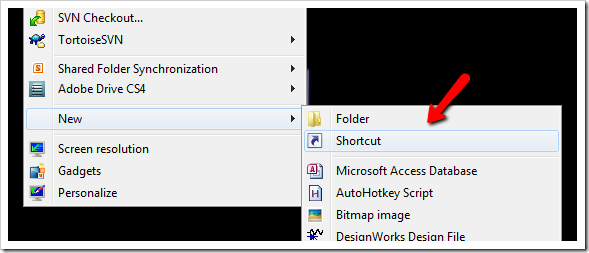
1. Right click on your Desktop and select New -> Shortcut.
2. You will see a “Create Shortcut” Dialog box as shown below
3. Click on “Browse”, navigate to your file or folder for what you want to create command. For example:
4. Now click on “Next” and type any name for your shortcut. You can
choose any name as per your choice and click on "OK" and on "Finish".
5. You will see a shortcut you have created on your desktop. All you
need to do is just copy this shortcut and paste it in your Windows
folder-->(“C:/Windows”). Once you have copied the shortcut into your
Windows folder, you can delete the one on your Desktop.
6. That’s it! From now on, just open the Run dialog box and type the
command you have crated and hit Enter to open the file/folder.


 8:10 AM
 salligaramu


 Posted in: tricks & tips


0 comments:
Post a Comment